Steam Workshop and Glossary Management
TransBox themes, glossaries, language packs, translation engines, and more can all be packaged as MODs. Players can subscribe on Steam Workshop; developers can drop files into a local directory for quick debugging.
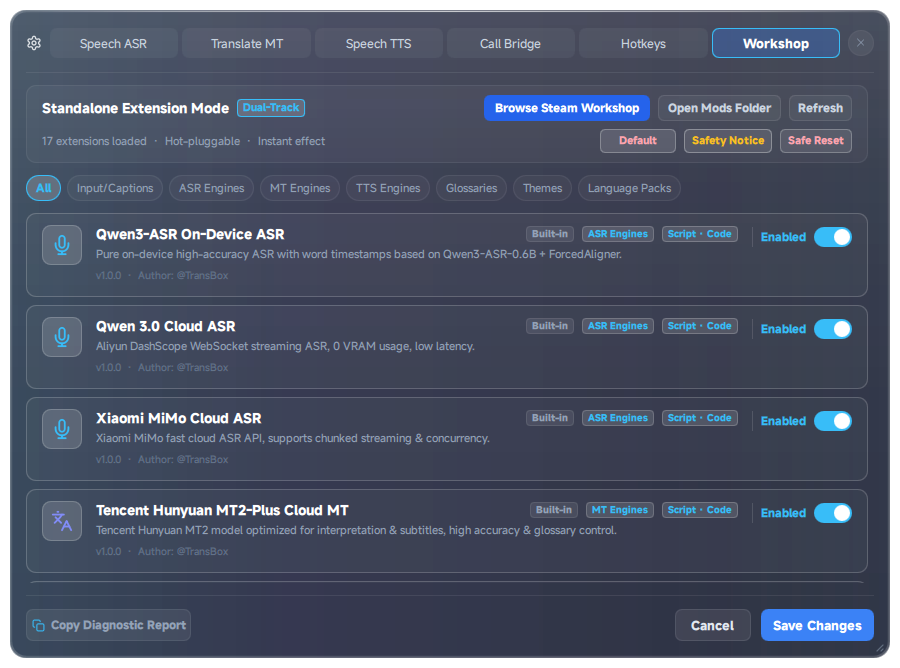
Entry point: Settings → Workshop.
1. Workshop Panel
- Dual-track mode
- Steam Workshop mode: subscribed MODs are scanned and loaded (Steam AppID:
1316080). - Local standalone extension mode: uses this machine’s
extensionsdirectory (for development and debugging).
- Steam Workshop mode: subscribed MODs are scanned and loaded (Steam AppID:
- Category filters: subtitle themes, domain glossaries, pipeline middleware, ASR / MT / TTS, UI language packs, input sources / subtitles, and more.
- Status tags: Active, Built-in, Workshop, Enabled, Disabled, Always-on base, and so on.
- Actions: Refresh, Browse Steam Workshop, Open local MOD directory, Export, Configure, Enable / Disable.
- Safe reset: one click disables all third-party extensions and returns the app to a bootable baseline.
- On first open you will see Community extensions & MOD safety notice: pure data packs (themes / glossaries / language packs) are lower risk; code/script plugins run with the same permissions as the main app — install only from sources you trust.
After you click Subscribe on the Steam Workshop page, return to the app and click Refresh to see the item. You do not need to restart each time.
2. Glossaries (Fix Machine-Translation Name Errors)
General models often mistranslate game jargon, character names, and item names. A glossary applies forced mappings before and after translation and can inject prompt hints.
Recommended format: terms.json
{
  "Elden Ring": "艾尔登法环",
  "Tarnished": "褪色者",
  "Malenia": "玛莲妮亚"
}
Or array form:
[
  { "src": "Elden Ring", "tgt": "艾尔登法环" }
]
Text format: terms.txt / terms.tsv
- Empty lines are ignored; lines starting with
#are comments; - The separator must be
=or Tab (\t); ->and=>are not supported (those two legacy forms are discarded line by line).
# Correct
Elden Ring=艾尔登法环
Tarnished	褪色者
Incorrect examples (do not use):
Elden Ring -> 艾尔登法环
Elden Ring => 艾尔登法环
The app ships with a built-in example: an Elden Ring game glossary (terms.json). After you enable it in the Workshop, the translation pipeline applies those entries.
3. Subtitle Themes and UI Language Packs
- Themes: change colors, transparency, and optional QML visual components. Full themes (
style_layer: full) are usually mutually exclusive — enable only one at a time. - Language packs: enabling one switches the interface language; missing strings fall back to the official English/Chinese. Third-party language packs are mutually exclusive.
The Interface language button on the floating bar cycles through enabled languages.
4. Safety Tips
- Prefer data-style extensions such as glossaries / themes / language packs.
- Before installing a Python engine / middleware, verify the author and source code.
- If something breaks, use Safe reset in the Workshop first, then re-enable items one by one.
- Do not put API keys into files you plan to upload to the Workshop; keys saved via password-type inputs in client config stay on your machine.
5. Are You a Developer?
See the developer hub’s Plugin specification and Workshop packaging & publishing.
Local debugging: Settings → Workshop → Open local MOD directory → drop in your folder → Refresh.