Web & Video Caption Extension Guide
When watching YouTube, Bilibili, Netflix, and similar sites, browser caption mode reads the page’s native captions (or a caption stream captured by the extension) and hands them to TransBox for translation. It does not rely on recording system audio through the microphone, so latency is lower and there is less ambient noise.
1. Enable the Service in TransBox
- Open Settings (tray or
Ctrl+Shift+P). - Go to the Browser Captions tab (the built-in plugin “Browser Native Captions (Web Caption)” must be enabled).
- Turn the service on. The default local WebSocket port is 8765.
- Confirm the status is “Running”. After pages connect, the number of connected tabs is shown.
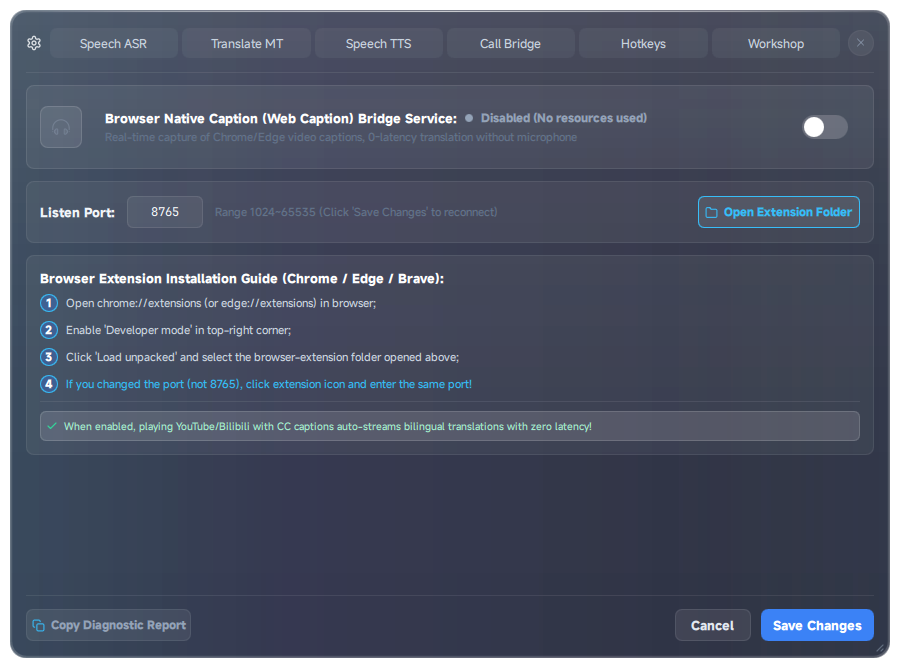
The browser caption bridge is off by default. While the service is off, “🌐 Browser captions” will not appear in the audio source list.
2. Install the Browser Extension
- Open Chrome / Edge / Brave and go to
chrome://extensions/in the address bar. - Turn on Developer mode in the top-right.
- Click Load unpacked.
- Select the
browser-extensionfolder in the TransBox install directory (note the hyphen, not an underscore). - Optionally pin the extension to the toolbar so you can watch its icon status.
On a Steam install, find that folder under the install directory; when running from source it is browser-extension/ at the repository root.
3. Switch the Subtitle Bar to the Browser Source
- With the service on and the extension connected, hover the subtitle control bar.
- In the Audio source dropdown, choose “🌐 Browser captions”.
- Turn on Translation (optionally Source and Read aloud).
- Play a web video: the translation should come from the web caption pipeline, not from sound-card ASR.
When the service is turned off: if the current source is still browser captions, it automatically falls back to “All system audio”.
4. Behavior Notes
| Feature | Description |
|---|---|
| Pure caption mode | Using the caption bridge can skip local ASR and skip capturing the system sound card |
| Seeking the timeline | Depends on page caption refresh; the path differs from “auto-clear cache” in local recording mode |
| Port conflicts | If 8765 is taken, change the port on the browser caption settings page and keep the extension in sync |
| Unsupported sites | Pages with no interceptable captions should use “All system audio” + ASR instead |
5. Troubleshooting
- No “Browser captions” in audio source → Confirm the service is on in Settings and the plugin is not disabled.
- Extension installed but cannot connect → Confirm the local TransBox service is running, ports match, and no firewall is blocking the loopback interface.
- Source shows but no translation → Check that the MT engine and API key / local model are ready.
- No captions at all → Try a video with native captions, or fall back to “All system audio” to verify the ASR path.